
.png)
Description
Download Mygoodtape – Secure Automatic Transcription for Journalists
Introduction
In the fast‑paced world of newsrooms, every minute saved on repetitive tasks translates directly into richer stories and tighter deadlines. Transcribing interviews, press briefings, or field recordings has traditionally been a labor‑intensive step that pulls reporters away from investigation and writing. Mygoodtape answers this challenge with a cloud‑based, end‑to‑end encrypted transcription engine built specifically for journalists. Whether you are covering a local council meeting on a Windows laptop or conducting a cross‑border interview on an iPhone, Mygoodtape promises a secure, multilingual, and user‑friendly experience that lets you focus on content rather than typing. This review walks through the core capabilities, installation workflow, system compatibility, and real‑world pros and cons so you can decide if Mygoodtape is the right addition to your editorial toolbox.
Overview and Key Features
Mygoodtape is a SaaS transcription platform created by the Danish newsroom Zetland. It combines advanced speech‑recognition models with GDPR‑compliant encryption, delivering high‑accuracy text from audio files in more than 90 languages and dialects. The service operates entirely in the browser, meaning there is no client‑side installation, and all processing occurs on secure cloud servers. Users upload recordings, select a source language, and receive a fully punctuated transcript within minutes. While real‑time streaming transcription is not yet available, the batch‑processing workflow is optimized for speed, reliability, and privacy—essential qualities for investigative reporting.
- Support for 90+ languages, including regional accents.
- End‑to‑end TLS 1.3 and AES‑256 encryption for data at rest.
- Batch upload and parallel processing of multiple files.
- Speaker diarisation to separate and label individual voices.
- Export options: TXT, DOCX, SRT, and plain‑text.
- Integrated web editor with timestamp navigation.
- 30‑day cloud storage of transcripts.
- Collaboration links for team review and editing.
- Automatic punctuation and newsroom‑style formatting.
- Full GDPR compliance and EU data‑center hosting.
These features combine to reduce transcription time by up to 80 % for typical news interviews. The multilingual capability eliminates the need for external vendors when covering international events, while speaker diarisation helps reporters locate key quotes instantly. Export formats align with most content‑management systems, allowing seamless insertion of transcripts into articles, subtitles, or briefing documents. Overall, Mygoodtape delivers a compelling blend of accuracy, security, and convenience that positions it as a strong contender against legacy transcription services that often charge per minute without offering comparable privacy safeguards.
Installation, Usage & Compatibility
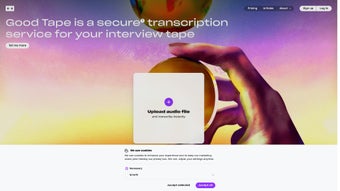
Mygoodtape is a pure web application, so there is no traditional software download. To start, visit mygoodtape.com, create an account, and verify your email. Optional two‑factor authentication adds an extra layer of security for sensitive sources. Once logged in, the dashboard presents a prominent “Upload” button. Drag‑and‑drop files from your desktop or click to browse; supported formats include MP3, WAV, AAC, and M4A, each up to 500 MB for free users. After selecting the source language (auto‑detect is also available), click “Start Transcription.” The platform encrypts the file before sending it to the processing cluster, then displays a progress bar while you continue working on other tasks.
Operating System Compatibility – Because Mygoodtape runs in the browser, it works on any modern OS with a recent version of Chrome, Firefox, Safari, or Edge. This includes Windows 10/11, macOS 10.15+, Linux distributions, Android 8.0+, and iOS 13+. The responsive design adapts to tablets and smartphones, and a Progressive Web App (PWA) wrapper lets you install a shortcut for offline access to previously downloaded transcripts.
Step‑by‑step usage guide
- Create a free account or select a paid plan that matches your transcription volume.
- Verify your email and enable two‑factor authentication (recommended).
- Navigate to the “Upload” area and drag‑drop or browse for your audio file.
- Select the source language or let the system auto‑detect.
- Start transcription; the file is encrypted before processing.
- Monitor the progress bar; you can work on other assignments meanwhile.
- When complete, open the transcript in the built‑in editor and use timestamps to jump to key sections.
- Apply any manual corrections, then export in TXT, DOCX, or SRT format.
- Share the transcript via a secure link or download it for local archiving.
Pros
- High accuracy across 90+ languages, even with background noise.
- Robust encryption meets GDPR standards.
- No client‑side installation; works on any modern browser.
- Speaker diarisation saves time during interview reviews.
- Collaboration links simplify team workflows.
Cons
- No live‑stream transcription for real‑time events.
- Free tier limited to 30 minutes per month.
- Absence of a public API restricts custom integrations.
- Files larger than 500 MB require manual splitting.
- Premium pricing is per hour of transcription, which can add up for high‑volume users.
Frequently Asked Questions
How secure is my audio data on Mygoodtape?
All audio files are encrypted in transit with TLS 1.3 and stored at rest using AES‑256 encryption. Only the account holder’s credentials can decrypt the data, and the service complies fully with GDPR and other European privacy regulations.
Can I transcribe live interviews as they happen?
Currently Mygoodtape only supports batch transcription of uploaded files. Real‑time streaming transcription is on the product roadmap but not yet available.
What file formats are accepted?
MP3, WAV, AAC, and M4A are supported. Each file can be up to 500 MB for free users; premium users can upload larger files after manual splitting.
Is there a way to integrate Mygoodtape with my CMS?
Mygoodtape does not currently provide a public API, so direct CMS integration isn’t possible. However, you can export transcripts in DOCX or plain‑text and manually import them into most content‑management systems.
How does the pricing model work?
A free tier offers 30 minutes of transcription per month. Paid plans are tiered by total transcription minutes (e.g., 5 hours, 20 hours) and include priority processing, unlimited 30‑day storage, and collaboration features. Prices are listed in USD per hour of transcription.
Conclusion – Should You Download Mygoodtape?
For journalists juggling tight deadlines, multilingual sources, and the need for airtight data security, Mygoodtape delivers a compelling mix of accuracy, privacy, and ease of use. Its extensive language support, speaker diarisation, and collaborative editing tools address the core challenges of modern newsgathering, while the browser‑based interface eliminates the friction of software installations. The main drawbacks—no live transcription and the lack of a public API—are offset for most editorial teams by the platform’s reliability and GDPR‑first stance. If you’re looking for a secure, cloud‑based transcription service that boosts productivity without sacrificing privacy, downloading Mygoodtape is a smart move. Start with the free tier to test accuracy on your own recordings, then scale up with a paid plan as your transcription volume grows.
Pros: Multilingual support, strong encryption, speaker diarisation, intuitive web UI.
Cons: No live transcription, limited free minutes, no public API.
Guides & Tutorials for Mygoodtape
How to install Mygoodtape
- Click the Preview / Download button above.
- Once redirected, accept the terms and click Install.
- Wait for the Mygoodtape download to finish on your device.
How to use Mygoodtape
This software is primarily used for its core features described above. Open the app after installation to explore its capabilities.
User Reviews for Mygoodtape 0
No reviews found




